Your crosshair.
Your rules.
Point Zero puts your own crosshair on top of any PC game. Design it in seconds, save one for every game and toggle it with a single key, without leaving the match.
- One-time payment: no subscription
- Windows 10 & 11
- Secure checkout
Players already aiming with their own
Open. Pick. Play.
It never touches the game and needs no account. It's a layer on top of your screen.
Open Point Zero
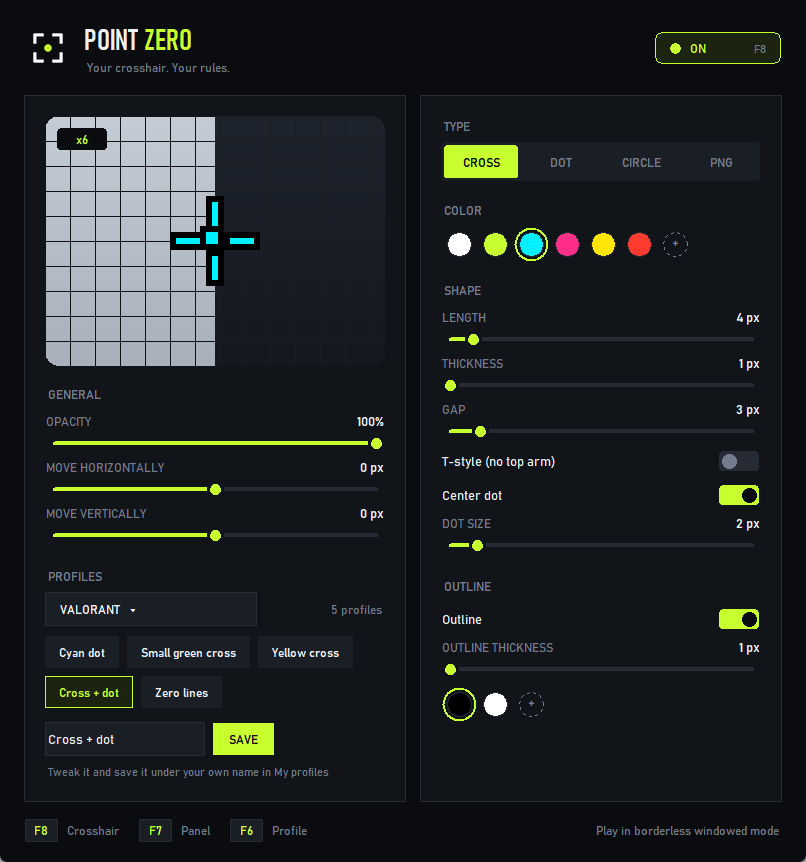
Download it and open it. It's free. The panel shows a live preview of your crosshair.
Pick your crosshair
Grab a profile for your game, tweak it or import your own PNG. Everything updates live.
Play
Your crosshair sits at the exact center of your screen. F8 toggles it, F6 switches profiles.
Design your crosshair right here
Pick a game, tap a profile or move the sliders. Switch the scene to see if it stands out against the sky, the snow or at night. Then click to shoot.
Profiles by game
Type
Color
Made for playing, not for configuring
Your own crosshairs
Draw your crosshair in any app, save it as a PNG and use it in game. No limits.
65 ready-made profiles
Styles built for Valorant, CS2, Fortnite, Apex, Warzone and 17 more games. Tap and play.
In-game hotkeys
F8 crosshair, F7 panel, F6 next profile. They work while you play.
Light / dark preview
The preview shows your crosshair on light and dark backgrounds at once, so you know instantly if it will get lost.
Never steals clicks
The crosshair is transparent to your mouse: your clicks go straight to the game. And it always stays on top.
Lightweight
No noticeable FPS cost: it draws one tiny image and nothing else. It remembers all your settings.
Why not just use the in-game crosshair?
Every game has its own. Here's the difference.
With Point Zero
- The same crosshair in every game, or a different one for each.
- Total freedom: shape, color, outline or your own PNG.
- Always visible: even where the game gives you none.
- Switch with one key, no menus.
- One-time payment with updates included.
Only the in-game one
- Every game has its own options and limits.
- Start from scratch in every new game.
- Some don't let you change it at all.
- Every change means digging through menus.
- Many crosshair apps charge you every month.
The 2 questions everyone asks
Can I get banned?
Point Zero doesn't modify the game, read its memory or inject anything. It's a transparent window on top of your screen, like other well-known crosshair apps.
Still, every game sets its own rules: if you play tournaments or servers with their own rules, check them first.
Does it work with my game?
It works with any PC game in borderless windowed mode, an option almost every game has.
No crosshair app can show over exclusive fullscreen: that's a Windows limit, not a Point Zero one.
Pay once. Yours forever.
Start free. When you want everything, pay once and it's yours forever, in every game. No monthly fees.
What does it cost in total?
This is everything. No hidden costs.
Frequently asked questions
What exactly is Point Zero?
A Windows app that draws your crosshair at the exact center of the screen, on top of any game. Design your own or pick one of 65 ready-made profiles.
Is there a free version?
Yes. Point Zero Free gives you cross and dot crosshairs, 3 colors, 1 profile per game and 1 custom profile, free forever. Upgrade to Pro from inside the app whenever you want, without reinstalling.
Is it a subscription?
No. Pay once and it's yours, updates included.
Which games does it work with?
Any PC game you can run in borderless windowed mode. It ships with profiles for 22 games, but you can use it with any of them.
Can I get banned for using it?
Point Zero doesn't touch game files, read game memory or inject code: it's a transparent window on top. Still, every game makes its own rules, so check yours, especially for tournaments.
Can I use a crosshair I drew myself?
Yes. Save it as a PNG with a transparent background and import it in one click. You can scale it and tint it any color.
Does it lower my FPS?
Not noticeably: it only shows one tiny image in the center of the screen.
Does it work with multiple monitors?
The crosshair is centered on your main monitor, which is where games usually run.
Do I need to install anything else?
No. Download Point Zero, open it and you're done. Works on Windows 10 and 11.
Does it work on Mac or consoles?
No, for now it's Windows PC only.
How do I get it after paying?
As soon as the payment goes through you get the download link and an email with your license key. Open Point Zero, click GET PRO, paste your key under “Already bought it?” and everything unlocks instantly.
How many PCs can I use it on?
Your key works on 2 PCs. If you switch computers, click “Release this PC” in the panel and activate it on the new one.
What if it doesn't work for me?
You're covered by the guarantee: we'll help you get it running in your game, and if we can't, you get your money back.
Still have questions? Write to us and a real person will answer.